End of offer :
0


Deal details
A new free surprise has arrived on the Epic Games Store, covering both Rocket League and Fortnite, with no actions required. This exclusive reward is part of the festive season, and every player can claim it instantly in just a few clicks. With this gift, your garage and customizations will get a unique style to celebrate the holiday spirit.
🎁 EPIC GAMES STORE GIFT
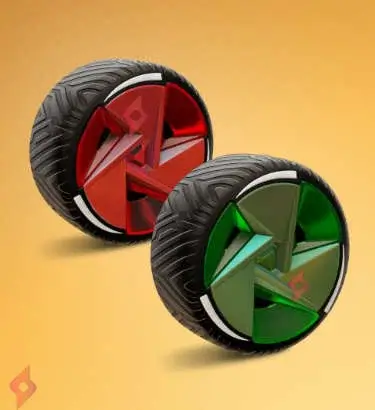
✅ TriTrim Crimson & Forest Green Wheels (free)
🎯 HOW TO GET THE TRI TRIM WHEELS
1️⃣ Go to the Epic Games Store using the “See Plan” button above.
2️⃣ Log in to your Epic Games account.
3️⃣ Click Get to add the gift immediately to your library.
4️⃣ The wheels will be automatically transferred to Rocket League when you launch the game.
5️⃣ They are also compatible in Fortnite via Rocket Racing, allowing you to customize your car in both games.
6️⃣ No quests, no challenges — everything is instant.
7️⃣ Simply claim the offer to receive the item.
8️⃣ This is a limited-time gift, designed for the holiday season.
📆 DATE
Available now — disappearing soon (no official end date).
❓ FAQ
❓ 1. Are the TriTrim wheels really free for all players?
Yes, the TriTrim Crimson & Forest Green Wheels are completely free for anyone with an Epic Games account. No level requirements or missions are needed. Simply claim them on the gift page to receive them automatically.
Yes, the TriTrim Crimson & Forest Green Wheels are completely free for anyone with an Epic Games account. No level requirements or missions are needed. Simply claim them on the gift page to receive them automatically.
❓ 2. Does the gift work on Rocket League and Fortnite?
Yes, once claimed, the wheels appear in Rocket League and are also usable in Fortnite via Rocket Racing. This makes the gift doubly useful for players of both games.
❓ 3. How long do I have to claim this reward?
The offer is limited and will end soon, giving a short window to claim it. Since this is a Christmas gift, it’s best to claim it quickly.
❓ 4. How can I check if the wheels are added to my account?
After clicking Get, the wheels will be automatically linked to your Epic Games account. Then, open Rocket League or Fortnite to see them in your inventory. If they don’t appear immediately, restarting the game often forces synchronization.